For independent mortgage loan officers
Every borrower file, processor-ready.
Answer a short interview about the loan. LoanMate works out exactly which documents that borrower needs, tracks what has come in, and tells you when the file is ready to hand off.
Free plan. No credit card. Sign in with an email link — no password to create.
Loans do not stall on underwriting. They stall on paperwork.
The gap between "I want to buy a house" and "the file is ready for review" is mostly document collection — and it is usually tracked in your head, a spreadsheet, or a thread of emails.
-
Every borrower needs a different list
Self-employed with rental income needs nothing like a W-2 buyer with a gift. Rebuilding that list from memory on each file is where things get missed.
-
Requested is not the same as received
Asking for a document and getting it are two different states. When they blur together, you find out at handoff.
-
Follow-ups fall through
A borrower goes quiet for nine days and nobody notices until the rate lock is in danger.
From first call to handoff
One prospect can have several loans over the years. You register the person once, and each loan runs its own independent workflow underneath them.
- 01
Add the borrower
Name, phone, email. A duplicate guard warns you if that person is already in your book.
- 02
Run the Smart Interview
Questions come one at a time — occupancy, income types, source of funds. Every answer saves itself, and the expected checklist updates live underneath as you go.
- 03
Get the checklist
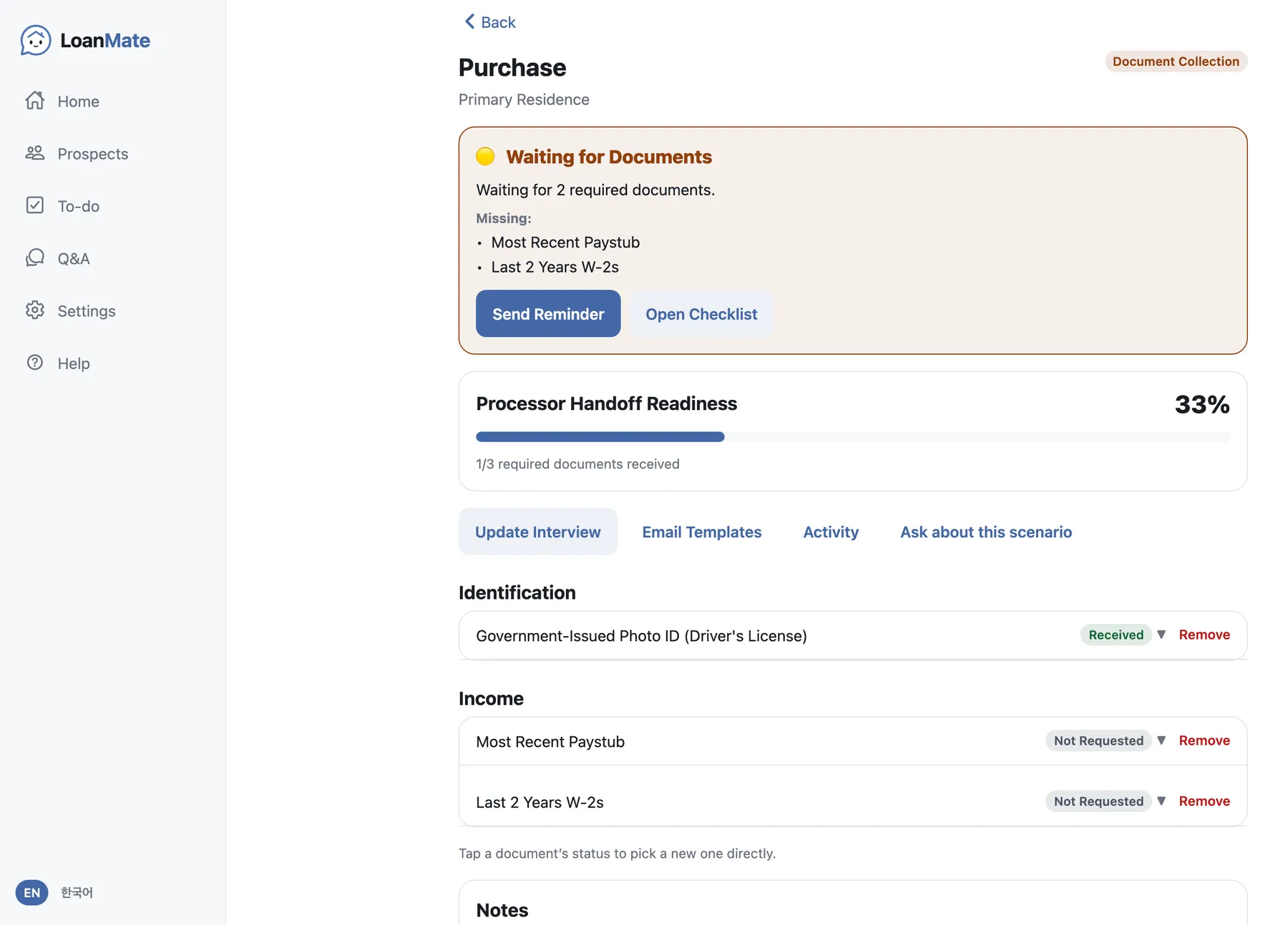
The rule engine turns those answers into the actual document list, grouped by Identification, Income, Assets, Housing and Additional. Change an earlier answer and documents that no longer apply drop off on their own.
- 04
Request and track
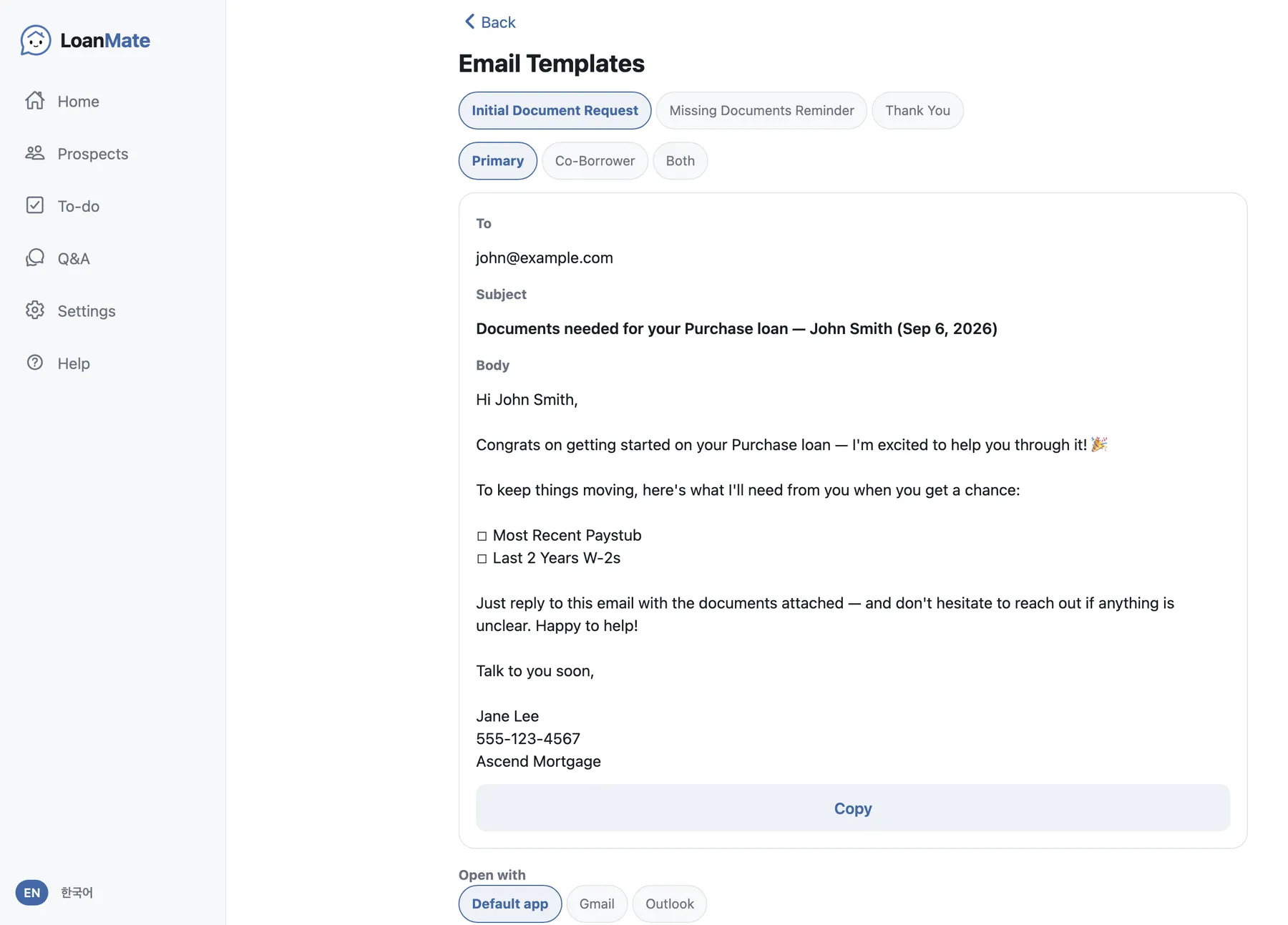
Send the request from a built-in email template that fills in the outstanding documents for you. As things arrive, tap each item from Not Requested to Requested to Received.
- 05
Hand off
When every required document is in, readiness hits 100% and the loan moves to Ready for Initial Review. That is where LoanMate stops and your processor takes over.
What you get
Built around one question: what needs to happen next on this file?
-
Smart Interview
A guided set of questions about the loan. Answers save as you type — there is no Save button to forget. Pick the wrong option and you can clear that answer and resume from that question.
-
Checklist that builds itself
Documents are derived from the interview, not from a fixed template. Optional items are marked as such and are excluded from the readiness calculation.
-
Readiness at a glance
A single percentage across required documents, plus the list of what is still outstanding. No guessing whether a file is actually ready.
-
Email templates
Initial request, missing-document reminder, and thank-you. Choose the recipient, let the outstanding items fill in automatically, and the send is recorded in the loan history.
-
Follow-ups that surface themselves
Tasks sort into Overdue, Today, Upcoming and Completed. Some are created for you as the loan moves. Snooze, complete or delete them.
-
Ask when a file gets complicated
Not sure how to structure a scenario? Ask from inside the loan and the case details go with the question. A mortgage expert answers within 24 hours. App problems have their own channel, so the two do not get mixed up.
-
Activity log
Significant actions on a loan are recorded automatically, so you can see what happened and when without keeping your own notes.
-
One person, many loans
A repeat borrower keeps their record. Each new loan starts clean — only name, phone and email carry over, so a prior file never contaminates the new one.
-
Phone and desktop
The same app on iPhone, Android and the browser. On a wide screen it opens into a sidebar and two-column layout instead of a cramped mobile view.
-
English and Korean
The entire interface, including the built-in manual, switches between English and Korean.
Being clear about scope
LoanMate is not a loan origination system.
It does one stretch of the process and stops. That is deliberate — it means LoanMate sits alongside whatever your lender already requires you to use, instead of competing with it.
What it does
- Works out the document list for each specific loan
- Tracks requested versus received
- Sends and logs document-request emails
- Surfaces overdue follow-ups
- Tells you when the file is ready for initial review
What it does not do
- Underwriting or automated underwriting (AUS)
- Pricing, rate locks or product selection
- Credit pulls
- Closing, disclosures or compliance filing
- Replacing your LOS
Start with your next borrower.
The free plan is enough to run a real file from first call to handoff. Nothing to install, nothing to configure.
- 1 Enter your email — we send you a sign-in link
- 2 Add a prospect and run the interview
- 3 Your checklist is waiting on the other side
No credit card. No password to create. Works in your browser today.